01
Navigator
See the structure. Act without detours.
Show semantic tag names, rename with a double-click, and reveal hide, duplicate, and delete actions right beside each element.

Editor Plus removes the tiny frustrations that slow down serious site builds—so structure stays clear, actions stay close, and styling takes fewer clicks.
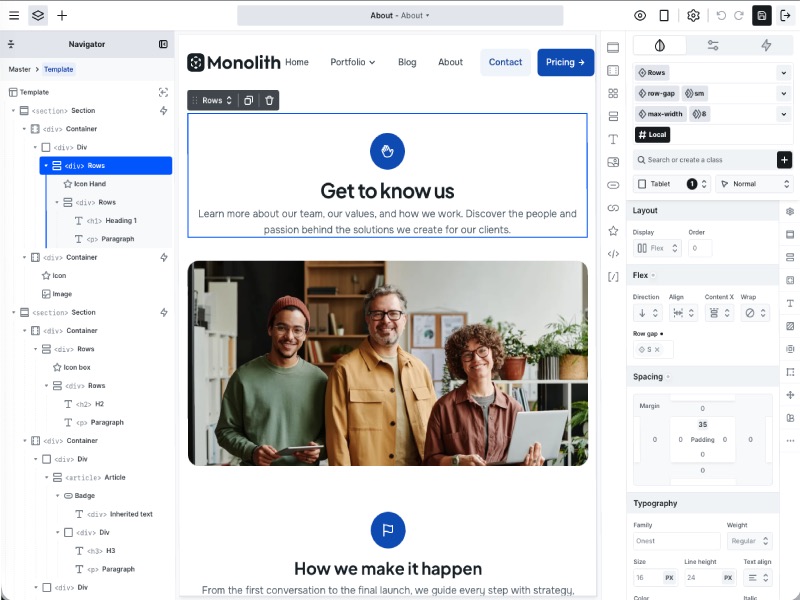
No new workflow to learn. Editor Plus adds thoughtful controls to the places you already work.
Show semantic tag names, rename with a double-click, and reveal hide, duplicate, and delete actions right beside each element.
Reset a defined field from its label—or clear an entire style group from its status bullet.
Switch between one, two, and three-column element layouts without leaving the panel.
Resize the docked sidebar, collapse style groups on load, or keep one group open at a time.
Open Mosaic’s native resource windows directly from the top toolbar—using the same built-in actions underneath.
Editor Plus turns repetitive editor chores into direct actions. The difference feels small once. Across a full build, it changes the pace completely.
We’ve created flexible plans to fit different needs and goals. Simply choose the option that works best for you and get started with the features that matter most.
Not at all. Editor Plus is built with performance in mind from the very beginning.
We’ve also optimized and tested the builder extensively, so you can enjoy all the extra functionality without sacrificing a smooth editing experience. Editor Plus works quietly in the background while keeping your workflow fast and responsive.
Yes, ongoing support is available to keep your website running smoothly. Updates, and technical help ensure long term stability.
No. Each license plan is offered as a separate, standalone package with its own features, limits, and pricing.
This keeps our licensing simple and transparent, so you always know exactly what is included with your purchase. If you need a different plan later, you can simply purchase the plan that best fits your new requirements.
Editor Plus is typically developed using the latest Mosaic Builder and PHP versions(8.2+). We aim to accommodate the widest variety of configurations, ensuring a smooth experience for everyone. If you happen to run into any issues related to your system, don’t hesitate to reach out to our support team!
We offer a 14-day 80% refund window on all purchases.
Why isn’t the refund 100%?
The 20% fee helps cover non-refundable transaction costs and administrative time. It also ensures fairness for users genuinely committed to using Editor Plus.
Yes. Our refund policy is designed to give first-time customers confidence when making a purchase, while also keeping the process fair for everyone. A refund may not be available in the following situations:
* The refund request is submitted more than 14 days after the original purchase date.
* You have already received a refund for a previous purchase, as our refund policy is limited to one refund per customer.
These conditions help us keep our refund process simple, fair, and sustainable, while preventing misuse of the policy.
No. Each license is issued specifically to the original purchaser and is intended for their own use.
To keep licensing simple, secure, and fair for all customers, licenses cannot be transferred, resold, or reassigned to another person or business. This also helps us provide reliable updates, support, and account management directly to the original license holder.
Follow the evolution of Mosaic Editor Plus—from essential workflow tools to visual layout controls and professional document-level CSS and JavaScript studios.
Version 0.1.8
Style Manager. Explore a searchable library of Mosaic classes with favorites, usage counts, and native controls for creating, renaming, duplicating, and deleting classes.
Browse and edit nested subclasses through Mosaic’s existing class and style APIs, then attach or detach them from the selected element.
Work in a bottom-docked interface with live canvas preview, a resizable divider, an expandable manager view, and generated CSS inspection.
Open Style Manager beside Mosaic’s native class search button or from its builder menu command above Keyboard shortcuts.
Use the class library before selecting an element. Choosing a class opens its native style controls without attaching it to anything.
Canvas selection now remains reliable while Style Manager is docked, and closing it restores the active element’s native Local styles.
Opening Style Manager without a selected element no longer selects the preview’s HTML node, and temporary preview selections are cleared on close.
Version 0.1.7
Document JavaScript Studio. Write validated Page, Template, and Site code, save it explicitly, and load it safely in the frontend footer.
CSS and JavaScript footer switches now preserve scope, layout, and unsaved drafts while you move between editors.
Open document code from the builder menu and use shortcuts beside CSS class and ID fields to create or revisit selectors.
Stable generated CSS and JavaScript files use content-hash cache versions, atomic writes, integrity checks, regeneration, and safe inline fallbacks.
Frontend CSS is minified without modifying the readable code stored in the editor, with supported page-cache purging after changes.
Side-docked toolbars wrap cleanly, Add-panel icons are a compact 20px, and obsolete generated assets are cleaned up.
Enter custom HTML tags directly in the navigator tag picker and synchronize them with Mosaic’s native tag setting.
Version 0.1.6
Manage the active element’s Mosaic ID and CSS classes, then create or navigate to rules through applied-state selector chips.
Resetting an ID or class removes its related Document CSS rule only when no other element still uses that selector.
Per-line errors, accurate totals, invalid-save protection, custom-property support, and CSS variable autocomplete improve authoring confidence.
Document CSS behavior moved to a dedicated, conditionally loaded script and clearer dock/split controls replaced ambiguous icons.
Version 0.1.5
Version 0.1.4
Version 0.1.3
Version 0.1.2
Version 0.1.1
Version 0.1.0